 File converter
for Windows
Spindle
Drag, press a key, drop.
Drag a file and press Shift. Pick what you want it to become. Done: the new file appears right next to the old one.
Download Spindle.exe ↓Source code ↗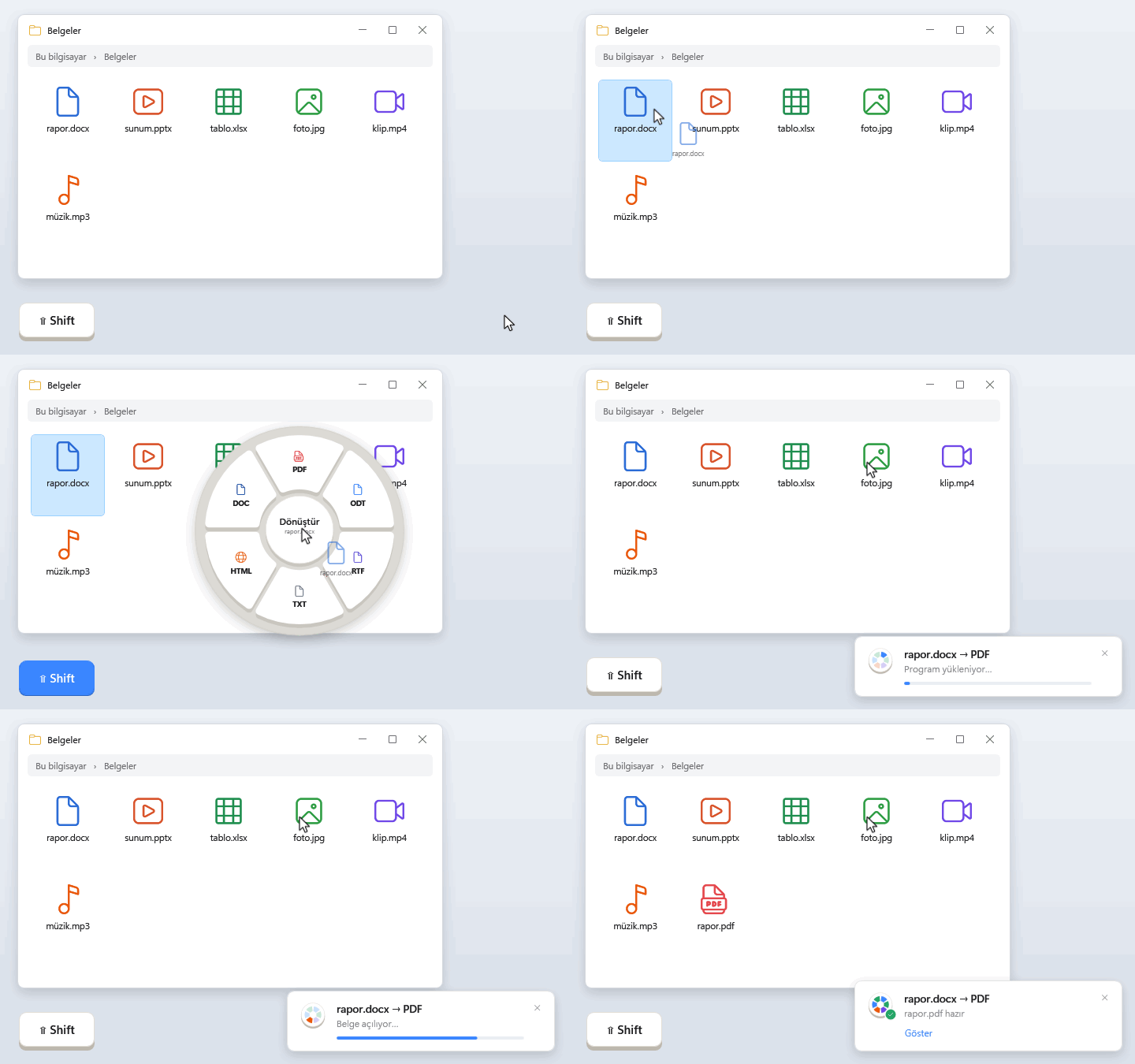
Stays on your computer.
No uploading. No waiting for a website. No sign-up. Spindle does it all right on your PC.
On a plane, on a train, anywhere. Spindle doesn't need the internet.
Nothing is sent anywhere. Not your files, not even their names.
Nothing to sign up for. Download it and use it.
Spindle doesn't watch what you do. It just converts.
Spindle only goes online if you choose to add music and video support in Settings.
How it works
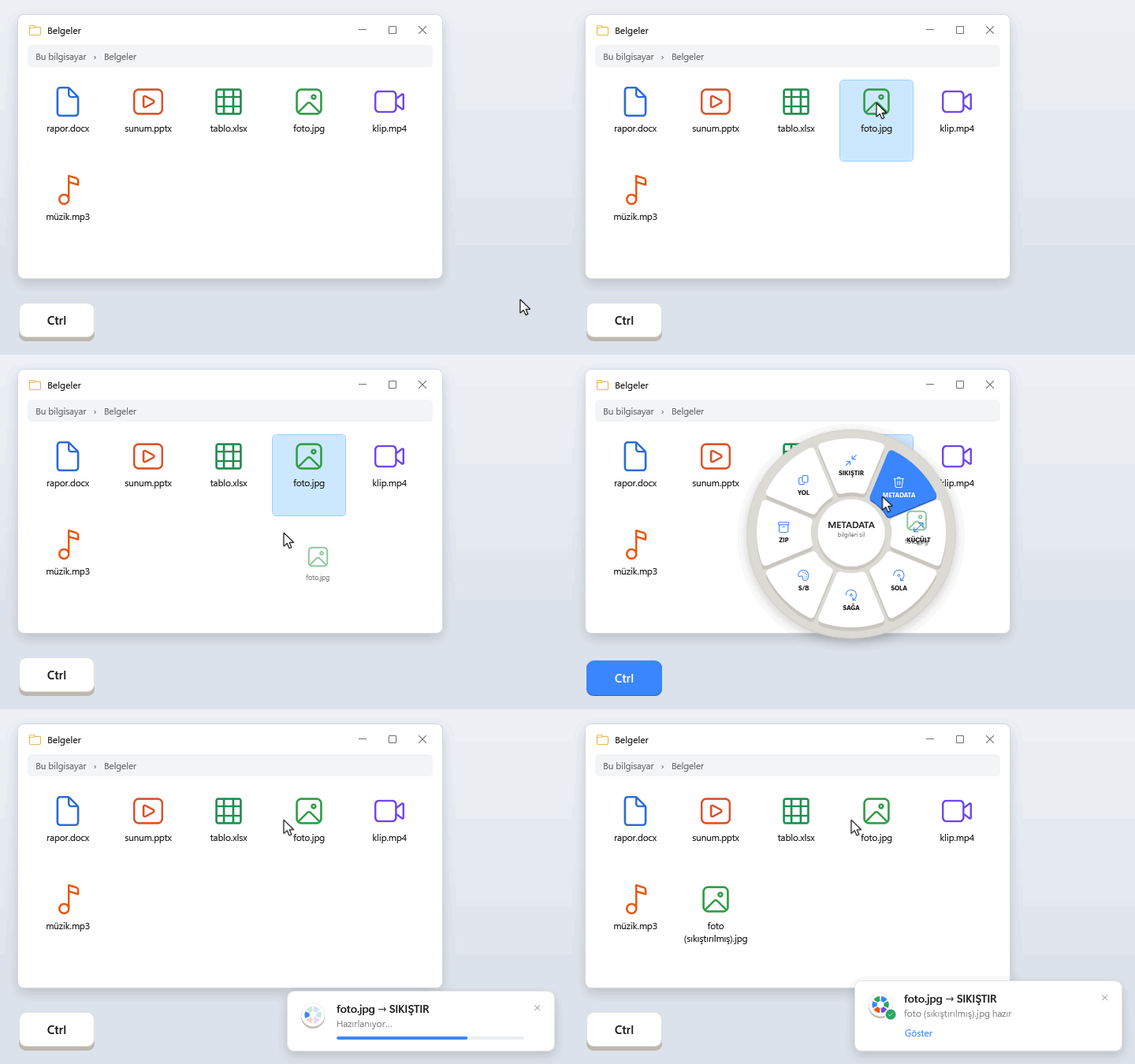
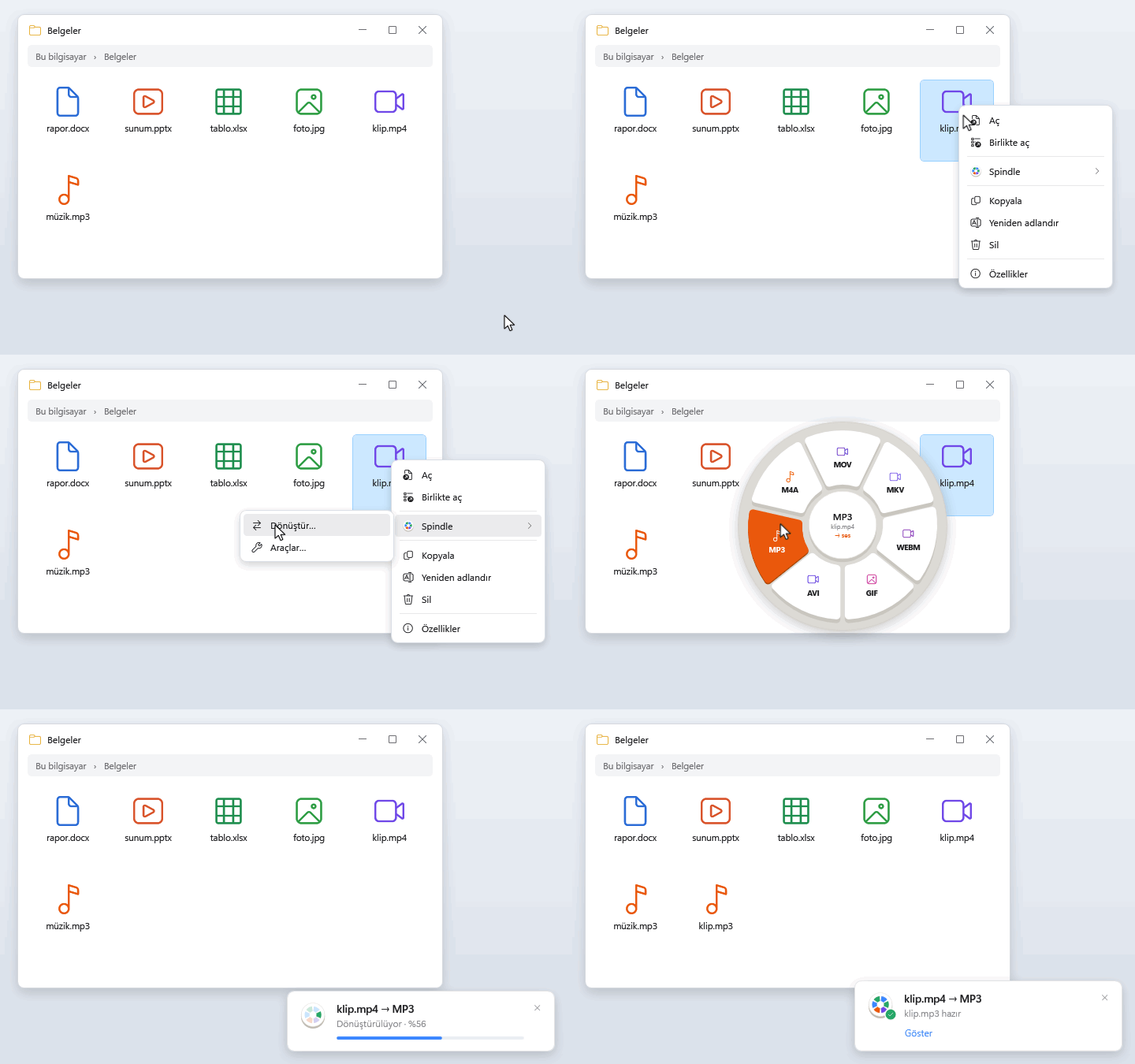
Three ways, all simple. Spindle shows you the first time you open it. (The app speaks Turkish for now.)
Each key has a color, so you can find what you want at a glance: documents blue, PDF red, photos green, video purple, music orange.
Make a photo smaller, turn it, or remove its location. Take the sound out of a video, or keep only the song.
Not a fan of dragging? Right-click the file and pick Spindle.
Formats
Choose the kind of file you have to see what it can become, and which one to pick.
Word document
Needs Microsoft OfficeOpens: .doc .docx .docm .dot .dotx .rtf .odt .txt
Converts to Shift
- Looks the same for everyone. Best for sending and printing.
- DOCX
- Today's Word file. Open old documents and keep editing.
- ODT
- LibreOffice / OpenOffice document.
- RTF
- Opens in almost any writing app.
- TXT
- Just the words, nothing else.
- HTML
- A web page that opens in a browser.
- DOC
- For very old versions of Word.
exampleDocuments\report.docx → Documents\report.pdf
Excel spreadsheet
Needs Microsoft OfficeOpens: .xls .xlsx .xlsm .ods .csv
Converts to Shift
- Share the sheet as pages anyone can open and print.
- XLSX
- Today's Excel file.
- CSV
- Just the numbers and text of the open sheet, ready for other apps.
- ODS
- LibreOffice Calc spreadsheet.
- XLS
- For very old versions of Excel.
examplebudget.xlsx → budget.pdf
PowerPoint presentation
Needs Microsoft OfficeOpens: .ppt .pptx .pps .ppsx .odp
Converts to Shift
- Send your slides to anyone, even without PowerPoint.
- PPTX
- Today's PowerPoint file.
- PNG
- Every slide as a picture, all in one folder.
- ODP
- LibreOffice Impress presentation.
- PPT
- For very old versions of PowerPoint.
exampledeck.pptx → a PNG per slide in the deck (slaytlar)\ folder
Opens: .pdf
Converts to Shift
- DOCX
- Edit the text in Word (needs Office). Pages full of pictures may look a little different.
- PNG
- Every page as a sharp picture.
- JPG
- Every page as a smaller picture.
examplearticle.pdf → an image per page in the article (sayfalar)\ folder · article.png for a single page
Photo, image
Nothing extra neededOpens: .jpg .jpeg .jfif .png .webp .heic .heif (iPhone) .avif .bmp .tif .tiff .gif .ico .svg .psd .tga
Camera RAW: .raf (Fujifilm) .raw (Panasonic/Leica) .dng .cr2 .cr3 (Canon) .nef (Nikon) .arw (Sony) .orf (Olympus) .rw2 (Panasonic) .pef (Pentax) .srw (Samsung)
Converts to Shift
- PNG
- Sharp, with see-through backgrounds kept. For screenshots and logos.
- JPG
- The everyday photo. Opens everywhere.
- WEBP
- Smaller than JPG. Great for websites.
- Send a photo or a scan as a document.
- AVIF
- The smallest photos. Works in newer apps.
- TIFF
- Full quality, for printing.
- BMP
- For older programs.
- GIF
- For simple graphics.
- ICO
- An icon for Windows.
Tools Ctrl
- Compress → photo (sıkıştırılmış).jpg
- Shrink by 50% → photo (küçük).jpg
- Remove location and camera info → photo (temiz).jpg
- Rotate left / right, black and white
exampleDSCF0065.raf → DSCF0065.jpg
Camera and iPhone photos open just fine. When you use a tool on them, the result is saved as JPG.
Audio, music
Needs a free add-on (one click in Settings)Opens: .mp3 .m4a .wav .flac .ogg .oga .opus .aiff .aif .wma .aac
Converts to Shift
- MP3
- Plays on everything.
- M4A
- Sounds as good as MP3 in a smaller file. Great on iPhone and Mac.
- WAV
- Full quality, for editing.
- FLAC
- Full quality in a smaller file. For your music collection.
- OGG
- Preferred by some apps and games.
- OPUS
- Tiny files that still sound clear. Ideal for voice recordings.
- AIFF
- Full quality, for Mac music apps.
- AAC
- For devices and apps that ask for AAC.
Tools Ctrl
- Make it smaller → recording (sıkıştırılmış).mp3
- Even out the volume of a recording that's too quiet or too loud → recording (dengelenmiş).wav
examplerecording.wav → recording.mp3
Video
Needs a free add-on (one click in Settings)Opens: .mp4 .m4v .mov .mkv .webm .avi .wmv .flv .mpg .mpeg .3gp .ts
Converts to Shift
- MP4
- Plays everywhere: phones, TVs, browsers. Not sure? Pick this.
- MOV
- For Apple apps.
- MKV
- Keeps several languages and subtitles in one file.
- WEBM
- Small videos for websites.
- GIF
- A short, silent loop to share.
- AVI
- For older players.
- MP3 · M4A
- Keep only the sound.
Tools Ctrl
- Compress → clip (sıkıştırılmış).mp4
- Make it lighter (720p) → clip (720p).mp4
- Remove audio → clip (sessiz).mp4 · Extract audio as MP3 → clip.mp3
exampleclip.mov → clip.mp4
Archive
Nothing extra neededOpens: .zip .tar .tar.gz .tgz
Converts to Shift
- ZIP
- Turns it into a ZIP that Windows opens on its own.
Tools Ctrl
- Extract to folder → a folder named after the archive
examplebackup.tar.gz → backup.zip
Output names such as (sıkıştırılmış) "compressed", (küçük) "small", (temiz) "clean" come from the interface, which is in Turkish for now.
Fast. And light.
Measured on the same PC as File Converter, a popular free converter.
Download.
Free. No installer, no sign-up.
Spindle.exe · 52 MB ↓GitHub · Omrndr/spindle ↗For Windows 10 and 11. Word, Excel and PowerPoint files need Microsoft Office. If Windows asks for the ".NET Desktop Runtime", it's free from Microsoft.